AI Image Commercial Use: Rights to Check Before Ads
· 6 min read
Permission to use an AI image commercially does not mean it’s cleared for ads. Before publishing, check 3 things: the tool’s terms, permission for every uploaded image, and rights in the finished output.
The review should cover:
- Tool and source permissions: Ad-use limits, upload rules, licenses, releases, and data handling.
- Image rights and accuracy: Copyright, logos, packaging, faces, product details, and claims.
- Placement and approval: Platform policies, disclosures, metadata, final crops, and dated records.
In the U.S., purely AI-generated images generally lack copyright protection, though human-authored parts may qualify. For each asset, record one decision: pass, revise, or escalate for legal review. Keep unresolved assets out of ads.
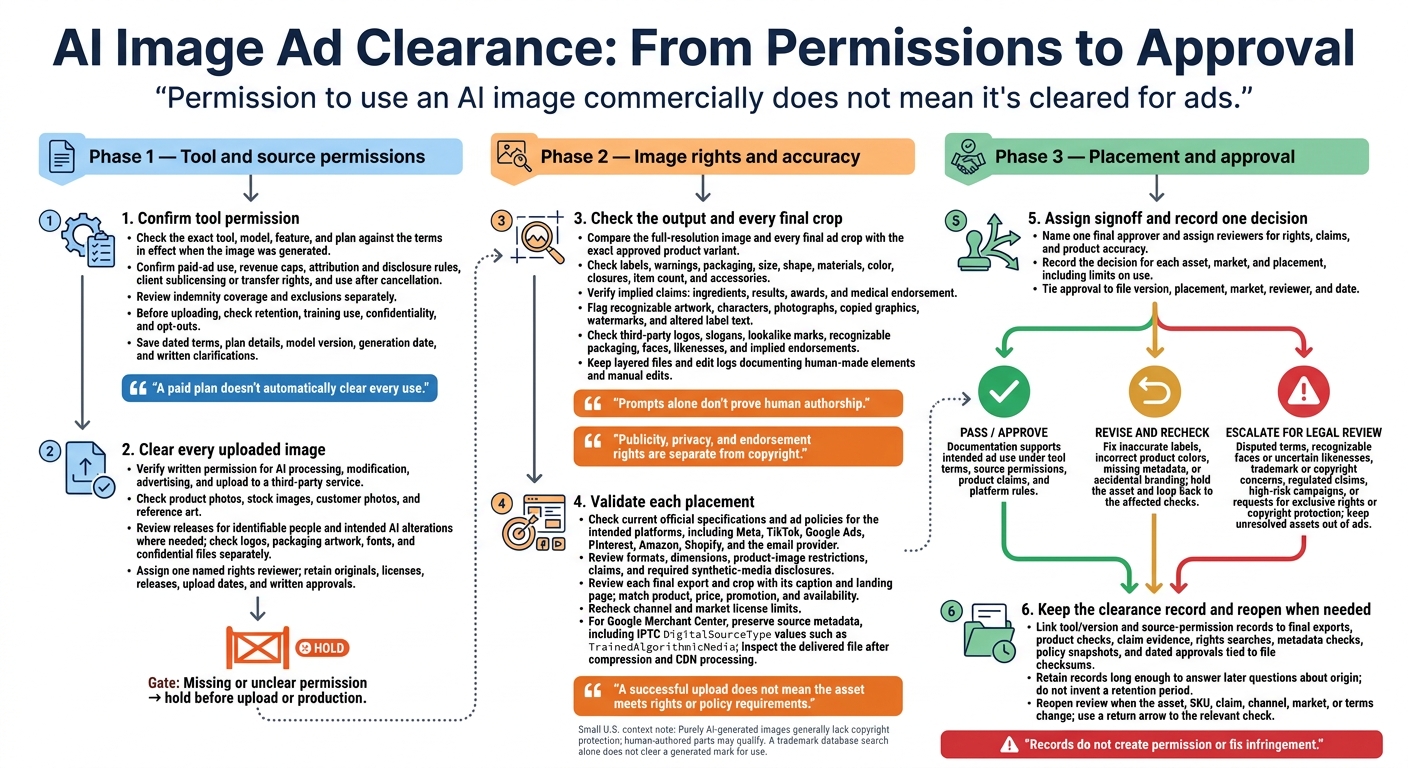
AI Image Ad Clearance: From Permissions to Approval
Check Tool Terms and Source Image Permissions
Confirm Rights for Your Tool, Model, and Plan
Check the tool’s terms before reviewing the output. Use the terms in effect when each image was generated, and confirm that the exact tool, model, feature, and plan permit paid ads. Review revenue caps, attribution and disclosure rules, client sublicensing or transfer rights, and use after cancellation. A paid plan doesn’t automatically clear every use.
Read the indemnity clause on its own. Check which claims it covers and which models or features it excludes. Before submitting files, also review upload retention, training use, confidentiality, and available opt-outs. Save dated copies of the terms, details of the active plan, the model version, the generation date, and any written clarifications about permission.
Verify Permission for Every Uploaded Image
Match every input to a written rights record before uploading it. For product photos, stock images, customer photos, and reference art, confirm permission for AI processing, modification, advertising, and upload to a third-party service. A photo commission or standard commercial license doesn’t necessarily cover AI processing or ad use. If the agreement is silent, get written clarification.
Check identifiable people separately. Where needed, obtain releases that cover the intended AI alteration and advertising use. Review logos, packaging artwork, fonts, and confidential files separately, too. Keep confidential files out of the service until its retention and training rules meet your obligations.
Assign one named rights reviewer to resolve gaps before upload or production. Store originals, licenses, releases, upload dates, and written approvals in a source rights folder. If permission is missing or unclear, hold the asset until the reviewer clears the issue. After the inputs are cleared, move to the output rights and brand-accuracy checks.
sbb-itb-e3697cd
Here's What You Can And Can't Copyright With AI
Review Image Rights and Product Accuracy
After clearing source rights, check the finished image for rights issues and product errors. Compare the full-resolution image and every final ad crop with the exact approved product variant. Check labels, warnings, packaging, size, shape, materials, color, closures, item count, and accessories. Reject features or props that suggest buyers will receive something the product doesn’t include.
Check implied claims, too. Ingredients, results, awards, and suggestions of medical endorsement need support - they can’t just look plausible. Even a crop can turn a background detail into a misleading focal point.
Check Copyright and Record Human Contributions
Flag recognizable artwork, characters, photographs, copied graphics, watermarks, and altered label text for revision or rights review.
Keep layered files and edit logs that document human-made elements and manual edits. Prompts alone don’t prove human authorship. When registering a work, follow the U.S. Copyright Office’s AI registration guidance to identify human-authored contributions and disclose AI-generated material.
Check Logos, Trademarks, and Packaging Designs
Check clothing, props, reflections, and backgrounds for third-party names, logos, slogans, lookalike marks, and recognizable packaging that viewers could mistake for another brand. Removing a logo may still leave a recognizable package shape or design - and trademark or trade dress risk. Before adopting a generated mark, search the USPTO trademark database and seek legal review. A database search alone doesn’t clear the mark for use.
Check Faces, Likenesses, and Endorsements
Check for required permissions when an image includes real people, faces resembling real people, faces derived from references, or children. Consider whether viewers could think an identifiable person endorses the product. Hold uncertain likenesses for legal review.
Publicity, privacy, and endorsement rights are separate from copyright. A generated face isn’t automatically cleared. After the image clears, move to placement rules and approval records.
Check Ad Placements and Keep Approval Records
Once the asset passes rights and accuracy checks, review its placement, policy compliance, and approval trail. This is the last check before launch.
Check Platform Rules and Ad Specifications
Check each placement against the current official specs and ad policies for Meta, TikTok, Google Ads, Pinterest, Amazon, Shopify, and your email provider. Review formats, dimensions, product-image restrictions, claims, and required synthetic-media disclosures. A successful upload does not mean the asset meets rights or policy requirements.
Review every final export and crop alongside its caption and landing page. Make sure the product, price, promotion, and availability match. Recheck license limits for the channel and market. For Google Merchant Center, preserve source metadata, including IPTC DigitalSourceType values such as TrainedAlgorithmicMedia. Inspect the delivered file after compression and CDN processing - not just the original.
Assign Review Duties Across the Campaign
Before launch, assign final signoff and responsibility for changes. Name one final approver, and assign reviewers for rights, claims, and product accuracy. The final approver owns the pass, revise, or escalate decision for each asset, market, and placement.
Tie each approval to a file version, placement, market, reviewer, and date. Reopen review whenever the asset, SKU, claim, channel, market, or terms change. Send unresolved trademark, likeness, or copyright concerns to counsel before release.
After approval, save the evidence needed to explain the decision later.
Keep a Campaign Clearance Folder
Link existing tool/version and source-permission records to final exports, product checks, claim evidence, rights searches, metadata checks, policy snapshots, and dated approvals tied to file checksums. Keep these records long enough to answer later questions about the asset’s origin. Records do not create permission or fix infringement.
Conclusion: Approve, Revise, or Seek Legal Review
Approve when the documentation supports the intended ad use under tool terms, source permissions, product claims, and platform rules. Permission for commercial use alone doesn’t clear third-party rights.
Revise and recheck fixable issues, such as inaccurate labels, incorrect product colors, missing metadata, or accidental branding. Keep the asset on hold until it passes review.
Seek legal review when tool terms are disputed, a face is recognizable, branding prompts concerns, or regulated claims need review. Escalate high-risk campaigns and requests for exclusive rights or copyright protection rather than treating them as routine production fixes.
Record one publication decision per asset, including any limits on use.
FAQs
Can I get exclusive rights to my AI ad images?
Commercial-use permission is not copyright ownership. Exclusive rights can be hard to secure: U.S. copyright protection requires meaningful human authorship, so entirely AI-generated images may not qualify.
Keep records of human contributions, such as manual edits and compositing. Use AI mainly where exclusivity matters less. For flagship campaigns, consider modifying original, human-authored materials instead. Copyright protection is assessed case by case, so consult qualified legal counsel about your plans for securing exclusive rights.
Who is liable if my AI ad infringes someone’s rights?
Your business is generally responsible for the AI-generated ads it publishes. AI platforms typically require you to make sure both your inputs and outputs follow the law and respect third-party rights.
Permission to use a platform’s output commercially doesn’t necessarily shield you from copyright, trademark, false endorsement, or right of publicity claims. Check your AI tool’s terms, including any indemnity provisions that address who is responsible for legal claims.
What if my AI tool changes its terms after approval?
Your usage rights depend on the agreement in effect when you generated the image. Today’s terms don’t retroactively apply to images you created earlier.
Save dated PDFs or screenshots of the terms, license agreements, and plan details that applied when you created each image. These records help show you had permission to use it if policies change or someone questions your rights.