AI Product Photos vs. Studio Shoots: Costs and Uses
· 10 min read
Part of our guide: How much does product photography cost?
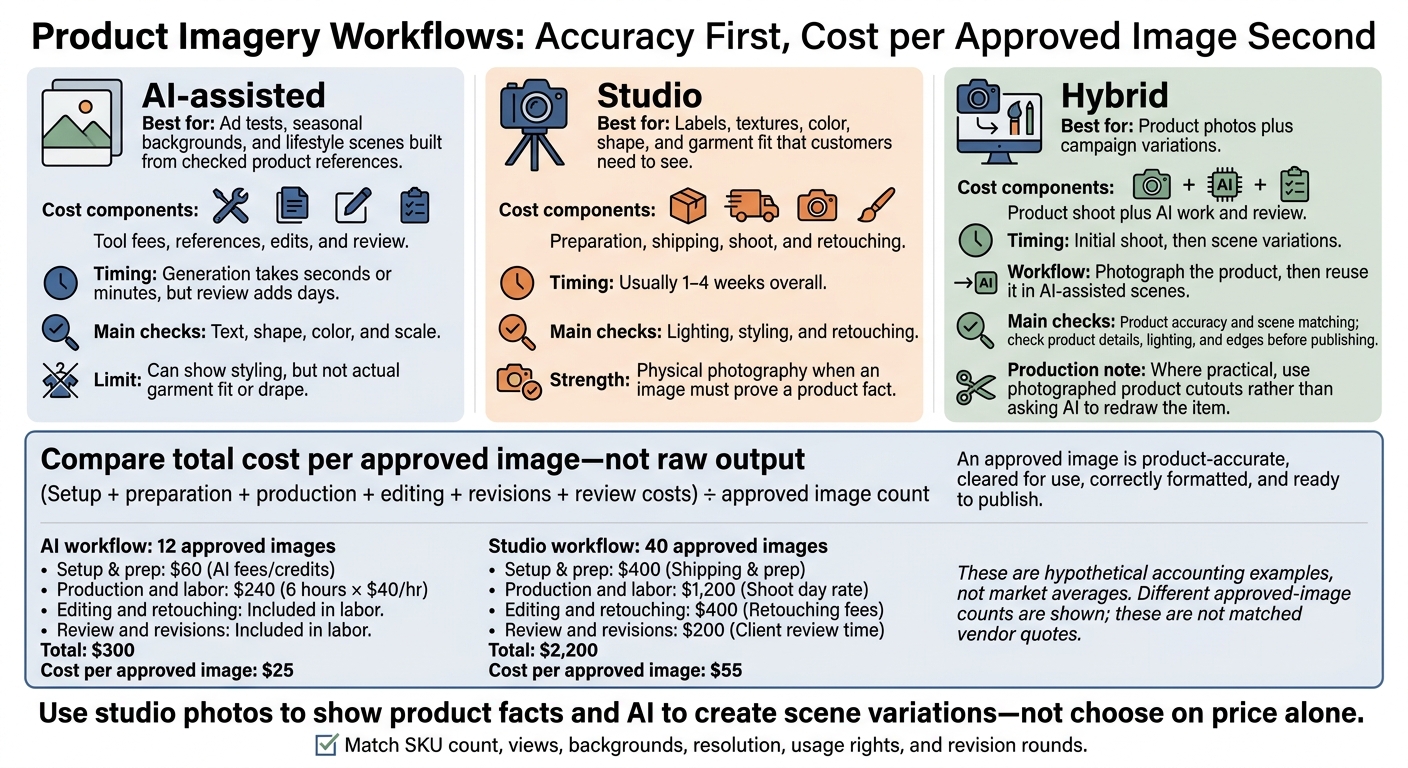
I’d use studio photos to show product facts and AI to create scene variations - not choose on price alone. U.S. planning ranges put standard studio images at $25–$75 each, but I’d compare total cost per approved image, including preparation, corrections, and review.
Here’s how I’d choose:
- Studio: For labels, textures, color, shape, and garment fit that customers need to see.
- AI-assisted: For ad tests, seasonal backgrounds, and lifestyle scenes built from checked product references.
- Hybrid: Photograph the product, then reuse it in AI-assisted scenes. Check product details, lighting, and edges before publishing.
Quick Comparison
| Factor | AI-assisted | Studio | Hybrid |
|---|---|---|---|
| Costs | Tool fees, references, edits, review | Preparation, shipping, shoot, retouching | Product shoot plus AI work and review |
| Timing | Fast generation; corrections add time | Usually 1–4 weeks overall | Initial shoot, then scene variations |
| Best use | Ads and background changes | Product details and physical behavior | Product photos plus campaign variations |
| Main check | Text, shape, color, and scale | Lighting, styling, and retouching | Product accuracy and scene matching |
More output doesn’t always mean lower costs. I’d count only images ready to publish, then compare vendors on revisions, usage rights, support, and brand consistency - not just their listed rates.
AI vs. Studio Product Photos: Choosing the Right Workflow
AI vs. Studio: Which One Actually Wins?
sbb-itb-e3697cd
AI vs. Studio: Costs, Steps, and Timing
Compare the same brief: match SKU count, views, backgrounds, resolution, usage rights, and revision rounds. The main difference is where the work happens. AI puts more effort into briefing and review; studio photography puts it into logistics, shooting, and retouching. Weigh the studio’s control over product accuracy against AI’s flexibility for scene variations.
Here’s where each workflow uses money, time, and review effort.
| Factor | AI-assisted product photos | Studio photography |
|---|---|---|
| Setup | Reference set, style references, prompt brief | Shot list, lighting plan, set, crew |
| Product preparation | Reference set and product details | Shipping, cleaning, steaming, positioning |
| Production | Generate batches and select images | Light, style, and shoot the products |
| Editing | Correct product details and resize | Retouch, color-correct, and export |
| Revisions | Regenerate or edit manually, then recheck details that should stay unchanged | Retouch where possible; reshoot if the original shot must change |
| Timing | Generation takes seconds or minutes, but review adds days | Shooting takes hours or days; total turnaround is usually 1–4 weeks |
| Client effort | Prepare references, brief, select images, and verify accuracy | Prepare samples, coordinate shipping, and approve shots and edits |
| Control | Fast scene changes; fine product details need close review | Direct control over lighting, packaging detail, texture, and shape |
| Accuracy risks | Altered text, geometry, textures, or scale | Human error in styling, lighting, or retouching |
| Volume | More variations without rebuilding physical sets; review work still grows with volume | More views and setups require more shooting and editing time |
These are planning guides, not quotes.
Complexity affects both budgets. Glass, chrome, and jewelry may need specialist lighting or more manual AI retouching. Location shoots add logistics, while elaborate styling adds physical set work. Studio coordination may take about 5–15 internal hours. AI moves that work toward briefing, selection, and detailed review. Extra approval rounds lengthen either schedule.
Compare the line items first, then calculate the total cost per approved image.
AI Costs: References, Corrections, and Review
Separate service fees from labor costs for reference preparation, briefing, generation, selection, corrections, resizing, and approval. If labels or materials need fixing, include that work in the AI budget.
Supply front, back, side, and - when needed - top views, along with label, texture, and scale references. Check logos, packaging text, color, texture, and scale against props or hands. Reflective, transparent, and textured products need closer review: a good-looking scene can still misrepresent what customers receive.
Studio Costs: Preparation, Shooting, and Editing
U.S. planning ranges are about $25–$75 per standard finished product image and $150–$500+ per styled lifestyle image. Day rates run about $800–$2,500 for a standard shoot or $1,500–$5,000+ for a concept-driven or brand shoot.
Confirm what the price includes: shipping and returns, shot lists, cleaning, steaming, styling, lighting, crew, props, models, retouching, exports, revisions, and reshoots.
Calculate Cost per Approved Image
An approved image is product-accurate, cleared for use, correctly formatted, and ready to publish. Divide all setup, preparation, production, editing, revision, and review costs by the number of approved images - not generated candidates.
Cost component AI workflow: 12 approved images Studio workflow: 40 approved images Setup & prep $60 (AI fees/credits) $400 (Shipping & prep) Production and labor $240 (6 hours × $40/hr) $1,200 (Shoot day rate) Editing and retouching Included in labor $400 (Retouching fees) Review and revisions Included in labor $200 (Client review time) Total $300 $2,200 Cost per approved image $25 $55 These are hypothetical accounting examples, not market averages.
Compare these totals against your needs: product-page accuracy, ad variations, or a mix of AI and studio work.
Which Method Fits Each Image Type?
Once you’ve worked out the cost, match the workflow to the image type. Start with the images that need the highest accuracy, then use the table to choose your approach.
| Image type | AI-assisted images | Studio photography |
|---|---|---|
| Packaging | Can preserve photographed packaging through compositing, but text, logos, and small label details need checking. | Records the actual labels and instructions on the physical product. |
| Materials | Can approximate a finish, but not the exact weave, grain, or facets. | Macro photography shows the real texture and detail. |
| Color | Can drift between variations, so compare results against approved references. | Gives you tighter color control. |
| Scale | Can misrepresent size through props or hands, so results need quality checks. | Real reference objects show relative size, though perspective still matters. |
| On-model fit | Can show styling, but not actual garment fit or drape. | Shows real fit and drape on the photographed person. |
| Lifestyle scenes | Supports different settings without rebuilding sets. | Works when the frame needs real handling or product behavior. |
| Bundles | Can test layouts, but item count, size, and accessories still need review. | Gives you direct control over physical arrangement and spacing. |
| Seasonal ad variations | Supports background and composition tests. | Provides a consistent source image, but new setups add production work. |
Physical photography still relies on lighting, styling, retouching, and quality checks.
Product Pages: Show Details and Fit
Use physical photography when an image must prove a product fact: ingredients, instructions, stitching, finishes, technical details, or apparel drape. Check the relevant platform specs before publishing.
Ads and Lifestyle Images: Create Variations
AI-assisted images built from verified product references work for seasonal scenes, banners, bundle layouts, and ad tests. Change the setting while keeping the product and campaign direction consistent.
Choose studio photography when the selling point depends on real handling, material behavior, or a specific person using the product. AI-assisted images are better suited to jobs where variation matters more than proof of a physical detail.
Do not present a generated person as a real customer. Check applicable synthetic-content disclosure rules before publishing.
Hybrid Production: Photograph Products, Then Add Variations
Build one reference set with front, back, side, top, and detail views. Keep physical photos for factual product-page content. Where practical, use photographed product cutouts rather than asking AI to redraw the item.
Use the same references, art direction, cast, and brand rules across variations. Match shadows, lighting, and product edges across versions.
Hybrid production works when you need factual product accuracy and flexible scenes in one workflow. Weigh the added coordination and retouching against usable variations - not raw output.
Compare Production Options Beyond Price
Polished assets can still miss the mark if they ignore the customer. Working with multiple vendors can also mean repeated briefs, mismatched casts, and changes in how the product appears across assets.
Once you understand the tradeoffs between AI and studios, compare the other production options you could use alongside them - or instead of them.
| Option | Cost structure | Timing | Client effort | Control over the work | Quality and scope |
|---|---|---|---|---|---|
| Studios | Per image, product, or shoot day; confirm extras | Usually 1–2 weeks | Prep, shipping, approvals | Detailed shot planning | Physical detail, packshots, styled shoots |
| Freelancers | Hourly, day, or project rate, plus expenses | Depends on availability and scope | Briefing, coordination | Direct collaboration | Photography or video quality depends on the portfolio |
| Agencies | Project fee or retainer | Weeks or longer | Briefing, approvals | Campaign-level direction | Managed, multi-format campaigns |
| UGC creators and marketplaces | Per creator or asset; confirm licensing | Often 1–3 weeks | Delivery, briefs, reviews | Depends on creator terms | Creator-led product demonstrations |
| DIY | Equipment plus your labor | Depends on skill and workload | You handle production | Direct control | Variable; good for basic listings |
| AI photo, video, or ad tools | Subscription or credits, plus review | Fast generation, but review work grows across formats | References, direction, corrections | Depends on the tool and references | Specialist tools can produce strong results when one format is the main goal |
Timing is an estimate; confirm preparation, revisions, and delivery in the quote.
Price and speed matter. But can the workflow keep the customer, brand, and product consistent from brief to final asset? For physical products, look for product accuracy and campaign consistency across formats.
Ask About Research, Brand Rules, and Consistency
Ask whether the team starts by researching your brand and primary and secondary customers. Check that it saves product language and brand do’s and don’ts for future orders.
Within a single order, the team should carry customer priorities, one concept, and a consistent cast across formats.
Confirm Accuracy Checks, Revisions, Rights, and Support
Confirm who checks labels, proportions, materials, and color. Ask how revisions work, which references you need to supply, and what usage rights you receive. Also check whether you’ll have a real support contact to resolve issues.
Product Campaign Studio says it addresses these needs in one workflow.
How Product Campaign Studio Works
Product Campaign Studio says it reviews your website, product pages, and social content, then builds customer profiles and creates a campaign brief and AI cast for multi-format production. It also says it applies brand rules, runs automated checks alongside human review, and saves rules and feedback for future work.
The company states that it includes two revision rounds per asset type and a support contact. Its stated prices are $10 per product image, $19 per lifestyle image, $12 per Meta static ad, $8 per social post, and $25 per banner set. Verify minimums, deliverable scope, and surcharges before publication.
Conclusion: Choose by Accuracy, Volume, and Budget
Protect product accuracy first, then compare cost per approved image. For every workflow, start with what the image must prove. Then weigh volume and budget.
| Your need | Starting workflow | When to switch |
|---|---|---|
| Small, accuracy-focused catalog | Studio photography | Add AI-assisted variations for seasonal backgrounds, localized settings, or ad crops. |
| Large catalog with many SKUs | AI or hybrid | Move to studio photography for SKUs whose labels, colors, or geometry keep failing review. |
| Repeat campaign across multiple formats | Hybrid: reuse one product shoot for new settings and crops. | Photograph new references when packaging or products change. |
Once you’ve chosen a workflow, price the full project, not just image production.
Before requesting quotes, list the SKUs, angles, close-ups, scenes, and channel formats you need. Keep product-proof images - those showing labels, texture, materials, and fit - separate from variation assets for ads, crops, and backgrounds.
Estimate how many approved images you need. Compare quotes that include preparation, shipping, production, corrections, review, and coordination. Divide each project total by its approved image count to compare costs.
FAQs
When do AI revisions cost more than a reshoot?
Repeated AI fixes can cost more than a reshoot. Correcting warped labels, inconsistent colors, and unrealistic proportions can take more editing and quality-checking time than a controlled studio session would cost.
AI can save time when creating lifestyle variations and large volumes of ads. But recurring product errors can wipe out those savings - and increase the risk of customer returns and harm to your brand.
Can I reuse existing product photos for AI scenes?
Yes. Reusing accurate, high-quality product photos helps keep your product’s appearance consistent and build customer trust.
Use your studio-quality photos as the reference. Have AI generate the surroundings, lighting, shadows, and reflections, then composite the real product photo into the scene.
This approach helps preserve packaging text, logo placement, and material textures across lifestyle images, seasonal variations, and ads - while keeping the speed and cost savings of AI.
How can I test a hybrid workflow before scaling?
Start with one low-risk SKU. Photograph the product from key angles, including close-ups, under neutral, controlled lighting. Pick one use case, such as lifestyle variants, and place the real product photo into AI-generated settings. Check logos, colors, packaging text, and scale against the physical product.
Track A/B test results, click-through rates, and return rates to spot gaps between what customers expect and what they receive. Use those findings to refine your prompts and quality checks before scaling.