AI UGC Videos: What E-Commerce Brands Need to Know
· 9 min read
I’d use AI UGC videos to explain a product - not to prove someone used it. Start with 3–5 hooks for one supported product claim. Use real footage when buyers need to see fit, drape, handling, or skin results.
Here’s how I’d decide what to make and what to publish:
- Choose the right format: AI for scripted explanations, human creators for firsthand experience, or both when the ad needs explanation and physical proof.
- Compare the full cost: Include review time, revisions, rejected renders, and usage rights - not just the generation fee.
- Check the provider: Review product accuracy, brand rules, support, and consistency across formats.
- Approve before spending: Verify claims, product details, licenses, disclosures, captions, and the final export.
- Test for sales or leads: Set a budget cap and judge results by cost per purchase or sign-up, not just views.
My rule: an AI label cannot fix a false claim. The video needs to match the product before it earns a place in your ad budget.
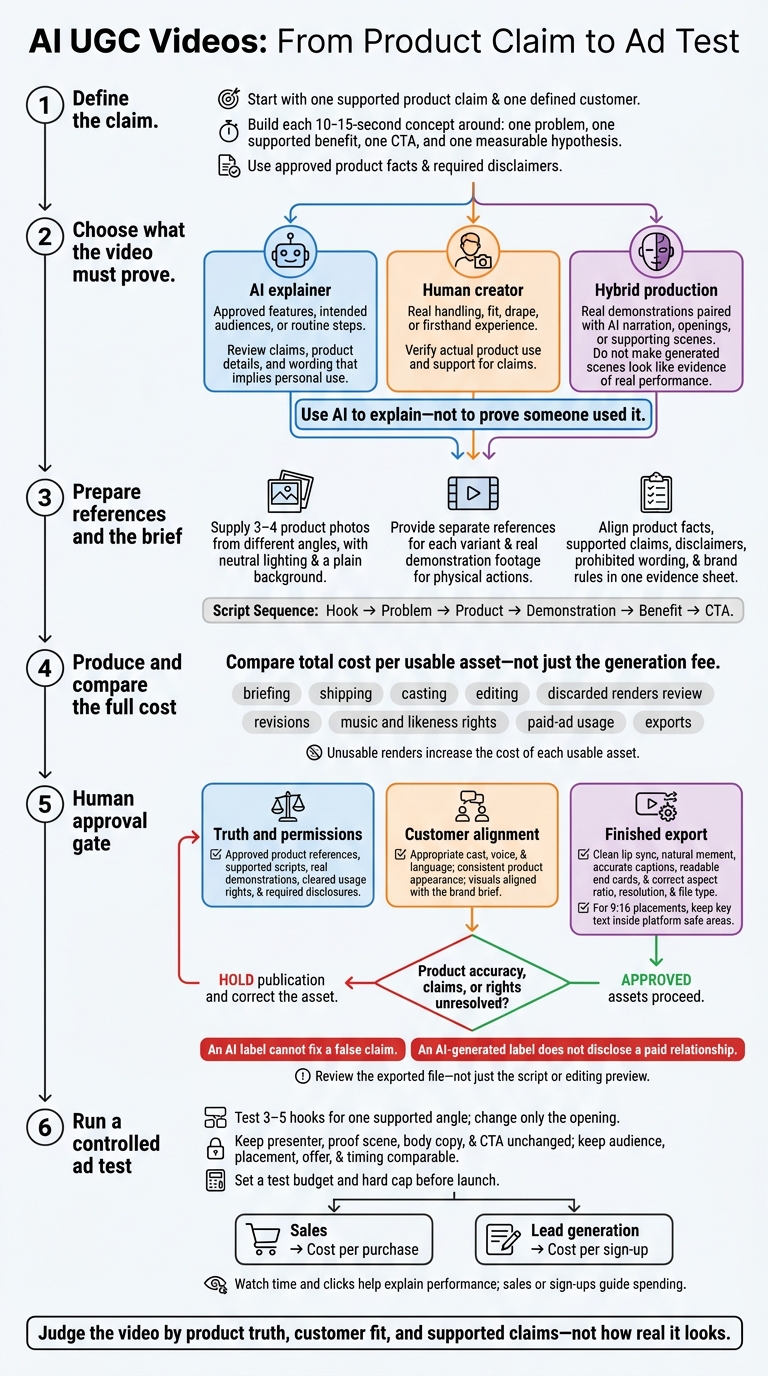
AI UGC Videos: From Product Claim to Ad Test
Where to Use AI UGC Videos
Product Explainers, Social Ads, and Caption-Led Videos
Use AI where the ad needs to explain, not prove. AI presenters can deliver approved brand facts. Build each 10–15-second concept around one problem, one supported benefit, one CTA, and one measurable hypothesis. Start with approved product facts and disclaimers, then write a hook for one defined customer.
| Placement and format | Main review point | Review before publishing |
|---|---|---|
| Store product page or marketplace listing: caption-led feature explainer or narrated overview | Generated details may differ from the shipped item | Match visuals, claims, product references, and listing copy to the exact product and variant |
| TikTok, Reels, Shorts, or Pinterest ad: short presenter clip | Presenter gestures or generated handling may misrepresent use | Check handling, captions, disclosure, and mobile crops |
| Retargeting: real product footage with AI narration | The script may promise more than the footage shows | Match each spoken benefit to approved evidence |
| Seasonal promotion: updated hook and offer | Price, availability, or promotion dates may become outdated | Verify the offer, landing page, and scheduled end date |
AI also works well for faceless formats, such as hands-only unboxings, POV shots, and narrated product demos. But the product determines how far AI can go. For apparel, use AI for print details and colorways, and real footage for fit and drape. Put the benefit and CTA in captions. When the script names a physical feature, show real product footage.
Write 3–5 hooks for the same supported benefit. Change only the opening; keep the presenter, proof scene, body copy, and CTA the same. Before launch, state what you're testing: whether the hook improves click-through rate without hurting purchase conversion. Attention metrics can help explain performance, but purchases or cost per qualified action should guide spending.
When to Use AI, Human Creators, or Both
Choose the format based on what the ad needs to prove.
| Approach | Choose it when | What needs close review |
|---|---|---|
| AI explainer | You need high-volume variations explaining approved features, intended audiences, or routine steps | Claims, product details, and wording that implies personal use |
| Human creator | The message requires real handling, fit, drape, or firsthand experience | Whether the person used the product and whether the claims have support |
| Hybrid production | You can pair real demonstrations with AI narration, openings, or supporting scenes | Edits must not make generated scenes look like evidence of real performance |
Treat a scripted performance as ad content, not proof of personal use or results. Check results, health, durability, and fit claims closely. Having a human creator deliver them doesn't make them supported.
Test factual hooks with AI. Commission human footage when promising angles need firsthand experience or physical proof. Treat that version as a separate ad test: the claim determines the footage needed, and changing the footage can change performance.
sbb-itb-e3697cd
Production Requirements, Costs, and Provider Choices
Once you know what AI can accurately show, production quality determines whether the asset is usable, accurate, and ready to test.
Prepare Product References and a Clear Brief
Provide 3–4 product photos from different angles, with neutral lighting and a plain background. Face labels toward the camera so text, colors, and shapes match the physical item. Supply separate references for each variant, plus packaging details, materials, dimensions, ports, and other fixed details - especially for placements that demand high product fidelity, like Amazon. Include real demonstration footage for any physical action the video needs to show.
Use a single brief for product descriptions, features you can prove, legally approved claims, required disclaimers, prohibited words or comparisons, and brand rules. Keep product facts, claims, and visuals aligned with one evidence sheet. Include the script, then map each beat to a visual using a Hook, Problem, Product, Demonstration, Benefit, CTA flow. Add presenter references and delivery requirements: placement, runtime, aspect ratio, resolution, captions, and audio.
With the brief locked, compare production paths on speed, control, rights, and total cost.
Compare Production Options and Total Costs
Compare total cost per usable asset, not just the quote. Count briefing, shipping, casting, editing, discarded renders, revisions, music and likeness rights, paid-ad usage, and exports. Timing depends on scope and revisions. Specialist AI tools can produce strong UGC-style videos or ads, but product details and scripts still need review.
| Option | Relative cost | Timing | Effort and control | Best fit |
|---|---|---|---|---|
| Photo shoots and studios | Scope-dependent | Varies by setup | Detailed planning and coordination | Controlled demonstrations and polished footage or photos of real products |
| Freelancers | Medium | Around 1 week | Coordination required; control depends on scope | A specific visual style using real assets |
| Agencies | High | Around 2–3 weeks | Upfront briefing and approvals; broader direction of concepts and visuals | Larger campaigns with coordinated production |
| UGC creators and marketplaces | Medium | Around 1–2 weeks | Shipping, briefing, and feedback; creator-led execution | Real handling and firsthand demonstrations; verify actual experience |
| DIY | Low–medium cash cost, plus staff time | Days | High effort and direct control | Brand-specific content with real-product access |
| AI photo, video, or ad tools | Often low generation cost; review costs vary | Minutes for generation; approval takes longer | Prompting, editing, and QA; control varies | Format-specific variations; product fidelity needs close review |
The test is whether the provider can keep product facts and brand rules consistent across every format.
Ask whether narration, captions, revisions, rights, and alternate exports are included. Unusable renders increase the cost of each usable asset.
Assess Research, Brand Memory, and Multi-Format Support
Check whether one concept, a researched customer profile, and one brand voice can carry across multiple formats:
- Audience research: What supports the primary and secondary customer profiles, and how does that research shape each asset’s language?
- Brand memory: How are product facts, brand rules, and prohibited claims stored and used in future work?
- Campaign consistency: Can one concept and cast carry across product images, UGC video, ads, banners, social, and motion without product details changing?
- Production coverage: Can one order cover the formats you need, or will you need multiple tools, vendors, and briefs?
- Accountability: Who handles corrections, and is a real person available?
Even well-made content can miss the mark if it rests on the wrong audience assumptions. Disconnected production can also lead to repeated briefs and inconsistent products or styling.
Product Campaign Studio manages niche research, casting, production, QA, approval, brand memory, revisions, and dedicated human support. Request the proposed deliverables, approval checkpoints, and correction terms. Use them to assess how the workflow supports your customer profiles, brand voice, and consistency across formats.
Review Product Accuracy, Claims, Rights, and Disclosure
After production and editing, the final step is legal and factual clearance.
Check Product Details and Demonstrations
Check the final export frame by frame against approved references. Review labels, logos, packaging, proportions, colors, components, dosage, and handling. Look for shifting liquid levels, distorted text, floating hands or fingers, and hands that never touch the product. Automated checks and Content Credentials cannot replace human approval. A human reviewer must approve accuracy before publication.
Demonstrations should match how the product actually behaves. Use real footage when claims involve fit, fabric weight, drape, or skin results. If a handling sequence is unreliable, replace it with verified footage or a simpler explanation.
Then check that the script stays within approved claims.
Remove Unsupported Testimonials and Results Claims
Flag any personal-experience claims made by AI presenters. Keep their scripts focused on approved product facts. The FTC’s rule on false reviews and testimonials took effect on October 21, 2024, and covers testimonials falsely attributed to people who do not exist.
Check spoken lines, captions, and visuals against supporting evidence, including results, health, and cosmetic claims. Every claim needs evidence. Use real before-and-after images rather than synthetic edits. An “AI-generated” label or disclaimer cannot fix a false claim.
Once claims are cleared, confirm the rights and disclosures required for publication.
Confirm Usage Rights and Required Disclosures
Get written rights for likenesses, voices, music, and logos. Confirm that permission covers paid-ad use, channels, territories, and license duration - not just creating the file.
Review synthetic-media and endorsement disclosures separately. An AI-generated label does not disclose a paid relationship. Check current FTC guidance and each platform’s policies before publishing.
Conclusion: Approve Before You Test
Once claims and rights are cleared, run a final check to decide whether the asset is ready for ad spend.
Use AI for approved product explanations and fast hook variations. Choose human creators when the ad calls for firsthand experience or proof that depends on a person’s body, such as apparel fit or makeup application. Combine both when AI can test the hook and real footage can prove the product. Judge the video by product truth, customer fit, and supported claims - not how real it looks.
Pre-Launch Quality and Brand-Fit Checklist
Before release, have a human reviewer sign off on three areas:
- Truth and permissions: Approved product references, supported scripts, real demonstrations, cleared usage rights, and required disclosures.
- Customer alignment: Cast, voice, and language that match the customer; consistent product appearance; and visuals that follow the brand brief.
- Finished export: Clean lip sync, natural movement, accurate captions, readable end cards, and the correct aspect ratio, resolution, and file type. For 9:16 placements, keep key text inside platform safe areas.
Hold publication if product accuracy, claims, or rights remain unresolved. Review the exported file - not just the script or editing preview.
Once the asset passes review, move to a controlled test.
Run a Small, Controlled Ad Test
Test 3–5 hooks for one supported angle, changing only the opening. Keep the audience, placement, offer, and timing comparable. Set the test budget and hard cap before launch.
Choose one primary metric tied to the objective: cost per purchase for sales or cost per sign-up for lead generation. Treat watch time and clicks as supporting signals. Judge the test by sales or sign-ups, not production polish.
FAQs
Can I turn real customer reviews into AI video scripts?
No - not if the testimonial presents the AI presenter’s experience as its own. AI-generated presenters can’t actually use a product. Portraying them as customers sharing personal reviews violates federal regulations.
AI can narrate factual product information, explain features, or share claims backed by evidence. But a statement like “I’ve used this for a month” must come from a real person who has actually used the product.
How much sales data do I need before scaling AI ads?
There’s no set amount of sales data you need before testing AI ads. Before scaling, measure purchases or sign-ups - not watch time or reach. Change one ad element at a time so you can see what works.
Treat winning versions as candidates for scaling, then use AI to produce more variations. Keep product details accurate, and back factual claims with real data or customer proof. The same advertising and testimonial rules still apply.
How can I tell if AI presenters hurt customer trust?
AI presenters can damage customer trust when they pose as real customers, claim experiences they haven’t had, or share made-up testimonials. These practices can also violate FTC guidelines.
Before publishing, check for personal claims, misleading customer portrayals, unnatural movements, conflicting product details, and missing disclosures required by platform policies.
Use AI presenters to explain product facts you can verify - not to vouch for results. Let real creators share their own experiences.