Ad Creative Fatigue: How to Refresh Product Campaigns
· 8 min read
I check the cause before replacing an ad. If frequency climbs and CTR falls over 3–5 days, I look for ad fatigue. If clicks hold steady but purchases drop, I check the offer, product page, checkout, and tracking first.
My approach is simple:
- Change one element: Test the opening 2–3 seconds or a product visual while keeping product facts, brand details, and the offer fixed.
- Choose production by fit: Compare cost, turnaround, product accuracy, formats, revisions, usage rights, and support.
- Test against the current winner: Keep settings matched and use a split test when possible.
- Judge purchases, not just clicks: I prioritize purchase CPA and contribution margin, then increase spending in small steps only if results hold.
A better click rate isn’t enough. I want evidence that the updated ad brings in buyers - not just more traffic.
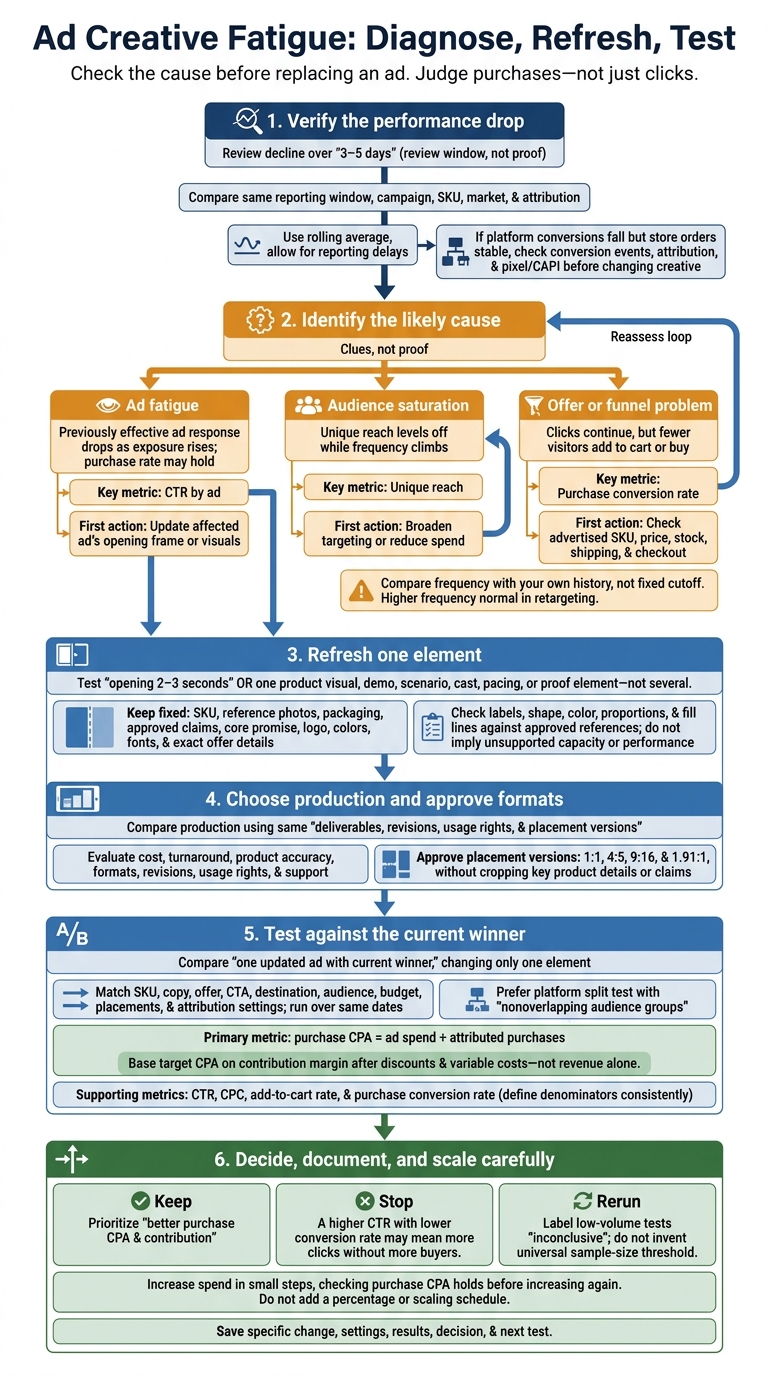
Ad Creative Fatigue: Diagnose, Refresh, Test
How to identify creative fatigue in your ads
sbb-itb-e3697cd
Check What Is Causing Ad Performance to Drop
Use performance signals to decide whether to update the ad, broaden the audience, or fix the funnel.
Review Engagement, Sales, and Delivery Together
Compare results from the same reporting window, campaign, SKU, market, and attribution setup. Use a rolling average to smooth daily swings, and allow for conversion-reporting delays before judging recent results. Check for seasonality changes and whether a budget increase pushed delivery into lower-performing placements.
Read engagement and sales metrics together: CTR, CPA, ROAS, frequency, CPM, CPC, unique reach, landing-page visits, cart additions, and purchases. Compare frequency with your own history rather than a fixed cutoff. Higher frequency is normal in retargeting.
Before replacing ad assets, compare platform-reported purchases with store orders. If platform conversions drop but orders stay stable, check conversion events, attribution settings, and pixel/CAPI deduplication. Look for unexpected changes to automated ad adjustments or catalog images, too.
Separate Ad Fatigue From Audience and Funnel Problems
Use the patterns below to decide where to look first. They're clues, not proof: auction pressure, tracking drift, and fatigue can overlap.
| Possible cause | Performance pattern | Key metric | First action |
|---|---|---|---|
| Ad fatigue | A previously effective ad gets less response as exposure rises; the purchase rate may hold briefly. | CTR by ad | Update the affected ad’s opening frame or visuals. |
| Audience saturation | Unique reach levels off while frequency climbs. | Unique reach | Broaden targeting or reduce spend. |
| Offer or funnel problem | Clicks continue, but fewer visitors add to cart or buy. | Purchase conversion rate | Check the advertised SKU, price, stock, shipping charges, and checkout. |
Pinpoint where the drop starts. Clicks without visits suggest page-speed, redirect, or tracking issues. Visits without cart additions suggest a problem with the variant, stock, or offer. Abandoned checkouts suggest shipping, promo-code, or payment issues. Test the mobile path, too: hidden buttons, popups, and layout shifts can block purchases.
Once you confirm fatigue, change only the affected ad element.
Plan Ad Updates That Keep Your Brand and Product Accurate
Once you confirm ad fatigue, write a brief that changes one variable without changing the facts about your product.
Choose One Ad Element to Change
Keep the production brief short. Separate what stays fixed from what you’ll test, and use the metric pattern that flagged fatigue to choose the first change. You’re changing how the ad presents the product - not what the product promises.
- Record what stays fixed: SKU, reference photos, packaging, approved claims, core promise, logo, colors, fonts, and exact offer details.
- Pick one change: the opening 2–3 seconds, product visuals, demonstration, customer-use scenario, cast, pacing, or proof. Explain what you expect it to improve.
- Check product accuracy: compare labels, shape, color, proportions, and fill lines against approved references. Demonstrations must not suggest unsupported capacity or performance.
- Approve placement versions: export 1:1, 4:5, 9:16, and 1.91:1 versions without cropping key product details or claims.
Then compare production options by how well each can deliver that same change.
Compare Production Options and What They Include
Request quotes for the same deliverables, revisions, usage rights, and placement versions. Compare scope, speed, control, and output quality. Pay close attention to whether each option can change one ad variable while keeping the product accurate.
| Option | Cost band and speed | Internal effort and control | Quality, consistency, and strengths |
|---|---|---|---|
| Photo shoots and studios | High; scheduling and production take time | Medium effort; high control | Strong for detailed physical-product photography with fixed product shape and proportions |
| Freelancers | Medium; moderate speed, depending on availability | Medium effort; high control | Good for specific production tasks; quality varies by individual |
| Agencies | High; discovery and production take time | Low effort once the brief is set; high control | Strong for strategy and campaign-wide alignment; can be expensive for frequent ad updates |
| UGC creators and marketplaces | Medium; moderate speed | Effort and control depend on briefing and review terms | Strong for natural demonstrations and content that feels native to the platform |
| DIY | Very low; variable speed | Very high effort; direct control | Useful for hands-on production; accuracy and formatting depend on your skills and review process |
| AI photo, video, or ad tools | Low; typically fast | Effort and control vary by tool and task | Specialist tools can work very well in one format; check product accuracy and consistency across formats |
Ask whether the team researches your brand and customers before production and understands your brand rules. Can it keep the product accurate across formats? Can it carry the same concept and cast across assets, deliver every needed format in one workflow, and provide a real person to resolve problems?
Even if you’re reviewing just one option, use the same criteria: research, accuracy, format coverage, and support.
Assess Product Campaign Studio by the Same Standards
Product Campaign Studio researches the materials you share - your homepage, product pages, Instagram content, photos, and brand guidelines - to build primary and secondary customer profiles. You choose an ad direction and AI cast, which can carry through images, ads, banners, motion, and UGC-style video. Brand review and automated product checks happen before client approval, while feedback builds brand memory for future campaigns. Ask to see those checks applied to your SKU, including platform sizing, revisions, and human support.
Confirm current pricing, format coverage, revision limits, review scope, and support before ordering.
Test Updated Ads Against an Existing Ad
Test your updated ad against the current ad before moving more budget to it.
Set Up a Fair Ad Test
Compare one updated ad with the current winner, changing only one ad element. Keep every other setting fixed.
Use the same SKU, copy, offer, CTA, destination, audience, budget, placements, and attribution settings. Run both versions over the same dates.
Make purchase CPA your main business metric: ad spend ÷ attributed purchases. Base your target CPA on contribution margin after discounts and variable costs - not revenue alone.
Also track CTR and CPC, plus add-to-cart rate and purchase conversion rate to assess buying intent. Define each metric’s denominator before the test, and use the same calculation for both ads.
Routine ad delivery isn’t a controlled test. Platform pacing can give the ads uneven delivery, making results harder to compare. For the clearest comparison, use the platform’s split-test feature with nonoverlapping audience groups. See TikTok’s creative guidance and split-testing guidance for setup details.
Record Results and Increase Spending Gradually
Track delivery and sales to see whether the update improved clicks, purchases, or neither. Use one worksheet per test, with a separate column for each ad. Compare the same date range and attribution settings, and give conversions time to appear before making a decision.
| Worksheet fields | What to record |
|---|---|
| Test details | Ad ID, specific change, audience, dates, attribution settings |
| Delivery | Spend, impressions, frequency, CTR, CPC |
| Sales | Add-to-cart rate, conversion rate, CPA, ROAS |
| Decision | Keep, stop, or rerun; reason and next test |
A higher CTR paired with a lower conversion rate may mean the updated ad draws clicks without drawing buyers. Prioritize better purchase CPA and contribution. Label low-volume tests inconclusive rather than forcing a universal threshold.
Increase spend in small steps, checking that purchase CPA holds at each higher budget before increasing again. Don’t assume the test’s performance will carry over to a larger budget.
Save the winning test record to guide the next ad update.
Conclusion: Check Your Ads Before Increasing Spending
Check the cause before updating an ad. Follow this sequence: diagnose, update, then test.
Confirm the cause: Has performance declined for 3–5 days while frequency rises and reach stays flat? Falling CTR with a steady post-click purchase rate points to fatigue. If CTR holds steady but purchases drop, check the offer, landing page, checkout, and tracking instead.
Define the update: If fatigue is the problem, change just one element, such as the first 2–3 seconds of video. Keep brand cues, SKU, label text, colors, proportions, and claims accurate. Before replacing the asset across placements, check whether the decline affects only certain placements.
Confirm test readiness: Choose the control and use cost per purchase as the primary metric. Verify that the audience, budget, and bidding strategy are comparable. Record what changed, why, the results, and which message or visual won. Use those preferences to guide the next test - not as permanent rules.
Let the data set the timing. Update the ad only when the data points to fatigue. Increase spend only when purchase results hold, and confirm that the updated ad improves purchase performance before scaling.
FAQs
How much data do I need to judge an ad refresh?
There’s no single data threshold for every test. The amount you need depends on your conversion cycle and audience size. Small samples can lead to inaccurate conclusions.
Before testing, set a review point and define your success metrics. Run the new ad alongside the existing one for three to five days, allowing enough time for your typical conversion window. Keep test conditions consistent. If you have too little data or the results remain inconsistent, mark the test as inconclusive.
Should I pause fatigued ads while testing replacements?
No. Pausing a scaled ad can reset its learning phase and hurt performance. Instead, run new ad content alongside the fatigued ad for three to five days. This gives delivery time to shift toward the better-performing assets.
When possible, use edit-in-place features to keep existing engagement and optimization history. Retire the fatigued ad once the new content has shown it can take over delivery.
Can I reuse an old ad after a break?
Yes, but treat it as a test - don’t assume the old ad will perform as it did before. First, check whether its earlier decline came from ad fatigue or other factors, such as seasonality, auction pressure, or tracking issues.
Run the old ad alongside your current ads for three to five days. This gives the platform time to relearn how it performs under current auction and delivery conditions without abruptly disrupting your existing campaigns.